Every backup script I've inherited had the same shape: a cron job, a dump command, a line that copies the result somewhere safe, and a log file nobody reads. It runs every night. It exits with 0.1 Everyone sleeps well.
Then somebody drops a table, and you find out what you actually had.
What a backup is for
A backup isn't a file. It's the ability to put the data back, to a point you choose, in a time you can live with. The file is just the part you can see.
So two questions matter more than any setting: how much data can you afford to lose, and how long can you afford to be down? Everything else is detail.
That sounds fussy until you list the ways a healthy-looking file can let you down:
- It's empty, because the disk filled up halfway and nobody checks the size.
- It's complete, but encrypted with a key that lived on the server you just lost.
- It restores, but it takes nine hours, and the business needed it back in one.
- It restores to last Tuesday, because the job has been failing quietly since Wednesday.
None of those show up in a log that says "done".
If you haven't restored it, you don't have a backup. You have a file and a good feeling.
Copying files instead of rows
For MySQL I use Percona XtraBackup. Instead of reading every row back out through the server the way mysqldump does, it copies InnoDB's data files while the database keeps running, then makes them consistent afterwards. On a large database, that's the difference between a backup that fits in the night and one that doesn't.
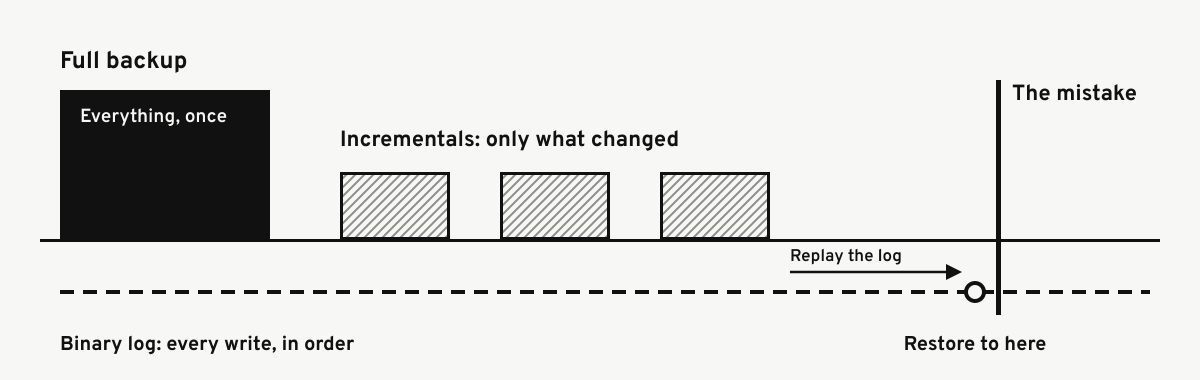
It also gives you incrementals. After one full backup, each later one only copies the pages that changed. They're small and quick, with one catch: an incremental is useless on its own. It's a diff against the backup before it, so a restore needs the whole chain, in order.
Everything gets compressed with zstd, which is quick enough that compression never becomes the slow part of the night, and leaves the files small enough to keep a good few weeks of them.
Restoring a chain
A restore isn't one command. It's a short sequence, and the order matters:
- Prepare the full backup, but leave it open for more changes.
- Apply each incremental to it, oldest first.
- Run a final prepare, which rolls back anything that never committed.
- Copy the files into an empty data directory and start MySQL.
In shell, that's roughly this:
# 1. prepare the base, keep it open for incrementals
xtrabackup --prepare --apply-log-only \
  --target-dir=/backups/full

# 2. apply incrementals, oldest first
for inc in /backups/inc-*; do
  xtrabackup --prepare --apply-log-only \
    --target-dir=/backups/full \
    --incremental-dir="$inc"
done

# 3. final prepare, then 4. copy back
xtrabackup --prepare --target-dir=/backups/full
xtrabackup --copy-back --target-dir=/backups/full
chown -R mysql:mysql /var/lib/mysql
Getting to the minute
A restored backup takes you back to the moment it finished. To get to the minute before someone ran the bad DELETE, replay the binary logs from the position XtraBackup wrote into xtrabackup_binlog_info, and stop just before the mistake.
Keep one copy out of reach
A backup on the same server as the database protects you from exactly one thing: your own DROP TABLE. It does nothing for a dead disk, a lost server or a stolen password. Keep at least one copy somewhere the database server can't delete, behind credentials it doesn't have. If whoever gets into your database can reach the backups with the same key, you have one copy, not two.
What I check before I trust one
This is what I want to see before I call a backup setup finished:
| Check | What it catches | How often |
|---|---|---|
| The file exists and isn't tiny | Empty or cut-off backups | Every run |
--prepare works on a copy | Corrupt or incomplete files | Every run |
| A full restore on a spare server | Broken chains, missing keys | Every week |
| A stopwatch on that restore | Backups that work but take too long | Every restore |
| Replaying the logs to a set time | Missing or rotated binary logs | Every month |
A backup job isn't finished when the file is written. It's finished when a restore from that file has worked, and someone has written down how long it took.
Make the restore boring
The goal isn't a clever backup system. It's a restore so routine that when you finally need one for real, it's the twentieth time you've done it, not the first. Put it on a schedule, time it, and write the steps down where the person on call at 3am can find them. That person is usually you.
Footnotes
-
Exit codes only tell you how the last command went. In a pipeline like
mysqldump | gzip, a failed dump still exits with0unless the script setsset -o pipefail. Back